QuillBot logo

QuillBot

QuillBot is an AI-powered writing assistant that offers paraphrasing, grammar checking, plagiarism detection, and sum...

Updated Jun 2026
writing#write-content
Free plan Teams Mobile app Browser extension

About QuillBot

QuillBot is a freemium AI writing assistant that combines paraphrasing, grammar checking, summarization, plagiarism detection, an AI detector, an AI humanizer, translation, citation generation, and AI chat into one platform. Available across the web, browser extensions, desktop apps, mobile apps, and Microsoft Word, it targets students, non-native English speakers, and professionals who want to rewrite, polish, and organize their writing efficiently. A free tier covers core needs, while Premium and Team plans unlock higher limits and collaboration.

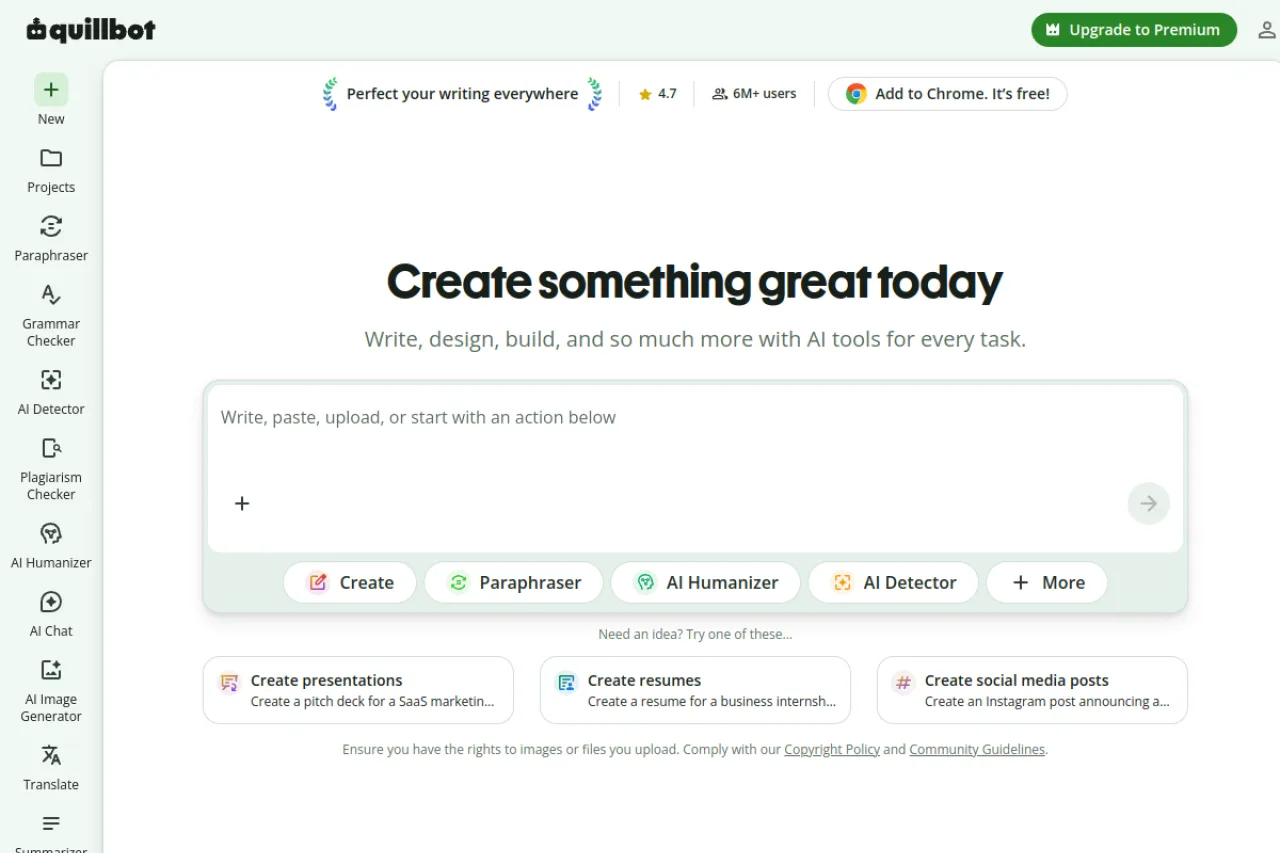
QuillBot is a comprehensive AI writing platform that bundles a wide range of text-improvement tools into a single workspace. At its core sit the tools that made it well known: a paraphraser for rewriting sentences and paragraphs in different tones, a grammar checker for catching errors and improving fluency, and a summarizer for condensing long documents. Around these, the suite has expanded to include a plagiarism checker, AI detector, AI humanizer, translator, citation generator, and an AI chat feature for brainstorming and drafting. The platform is built to meet writers wherever they work. Beyond the web app, QuillBot ships browser extensions for Chrome, Edge, and Safari, native apps for Windows, macOS, Android, and iOS, and an integration for Microsoft Word. This broad footprint means the same paraphrasing and grammar assistance is available inside email, documents, and web forms without copying text back and forth. A newer Projects feature lets users organize work across the various tools in one place, and the homepage now emphasizes a broader "create" workflow spanning document drafting, presentations, resumes, and even AI image generation. This positions QuillBot as more than a single-purpose paraphraser and closer to an all-in-one AI writing and content workspace. QuillBot follows a freemium model: the free tier offers limited access to most tools, while Premium unlocks unlimited use, longer input limits, and additional paraphrasing modes. Team plans add multi-seat management for groups and organizations. As always, buyers should verify current pricing and feature limits on the official site, since plans and tiers change over time. With a large user base and partnerships with recognized brands, QuillBot has become one of the most widely used writing assistants among students, non-native English writers, and everyday professionals who want polished output quickly.

TL;DR

QuillBot is an AI writing platform that combines paraphrasing, grammar checking, summarization, plagiarism detection, citation generation, translation, and AI chat into one freemium suite. Founded in 2017, it has grown to a large user base and roughly $27.4M in estimated ARR without outside funding. Its paraphraser and broad platform coverage make it a go-to for students and non-native English writers.

Company overview

QuillBot was founded in 2017 by Rohan Gupta, Anil Jason, and David Silin as an AI writing tool for paraphrasing and clarity, later expanding into a broad writing suite. In September 2021 it was acquired by Course Hero (now Learneo) and today operates as a Learneo product alongside Course Hero, CliffsNotes, and LanguageTool.

Product features

QuillBot's core capabilities center on transforming and improving existing text. The Paraphraser rewrites content across multiple modes with adjustable synonym control, the Grammar Checker corrects errors and improves fluency, and the Summarizer condenses long material into key points. These are complemented by a Plagiarism Checker, AI Detector, AI Humanizer, Translator, and Citation Generator that together cover much of the academic and professional writing workflow.

An AI Chat feature supports brainstorming and drafting through conversation, which users can then carry into document and design tools. The Projects feature ties these tools together in a shared workspace so related work stays organized.

Broad platform coverage is a defining trait: QuillBot ships extensions for Chrome, Edge, and Safari, native apps for Windows, macOS, Android, and iOS, and a Microsoft Word integration, letting its assistance follow users across the environments where they actually write.

Target market

QuillBot serves education, writing, and marketing segments, with particularly strong appeal to students, academic researchers, and non-native English speakers who need help paraphrasing and polishing prose. It also targets content creators, marketers, and everyday professionals who want quick rewriting, grammar, and summarization tools, along with small teams via its Team plans.

Buyer personas

End users

Students, non-native English writers, and professionals who use the paraphraser, grammar checker, and summarizer to refine and produce writing quickly. They value fast, in-context help across the browser, documents, and mobile devices.

Buyers

Individual subscribers who upgrade to Premium for unlimited access and higher limits, plus small team leads or department managers who purchase multi-seat Team plans.

Key influencers

Instructors, writing tutors, and peers who recommend QuillBot as an accessible writing aid, as well as internal advocates in teams that adopt it for consistent output.

Ideal customer profile

An individual or small group that regularly writes or edits text — especially students and non-native English speakers — and wants an affordable, all-in-one assistant for paraphrasing, grammar, summarization, and citations across web and browser.

Funding & performance

QuillBot is owned by Learneo (formerly Course Hero), which acquired it in September 2021, so it is not an independent, bootstrapped company. Learneo has raised roughly $492 million and was valued around $4 billion. Third-party ARR estimates for QuillBot (about $27M) are approximate.

Pros & cons

Pros

  • Comprehensive suite of writing tools including paraphraser, grammar checker, plagiarism detector, summarizer, and citation generator in one platform
  • Available as both web application and Chrome browser extension for flexible access across writing environments
  • Offers a free tier allowing users to test core functionality before committing to premium features

Cons

  • Research does not specify limitations of the free tier versus premium features, making it unclear what functionality is restricted
  • Pricing structure and specific costs for premium tiers are not disclosed in the available research

Key features

Mobile app
Browser extension
Team collaboration
Multi-language
Integrations
Microsoft Word, Chrome, Microsoft Edge, Safari
Input types
text, documents
Output types
text, citations, images

Compare key features

View all alternatives →
Feature
QuillBot
HubSpot AI
TextCortex
Pricing
Freemium
Freemium
Freemium
Free plan
Yes
Yes
Yes
Free trial
No
No
No
API
No
Yes
No
Team support
Yes
Yes
Yes

Frequently asked questions

How much does QuillBot cost and what will I actually pay?+

QuillBot uses a freemium model with a free plan at $0 that covers core tools with usage limits. Premium is commonly billed around $8.33 per month on an annual plan, with more expensive monthly and semi-annual options, and Team plans start near $7.50 per user per month for small groups. Pricing changes over time, so verify the current rates on QuillBot's official upgrade page.

How does QuillBot work day to day?+

You paste, type, or upload text into a tool such as the Paraphraser, Grammar Checker, or Summarizer, then adjust settings like paraphrasing mode or synonym level to shape the output. Results appear instantly and can be edited, copied, or carried into other tools. The Projects feature lets you keep related work organized across tools in one workspace.

Where can I use QuillBot and how do I set it up?+

QuillBot runs in the web app and offers a browser extension for Chrome, Edge, and Safari, plus native apps for Windows, macOS, Android, and iOS. It also integrates with Microsoft Word. Setup is typically as simple as creating an account and installing the relevant extension or app for the environment where you write most.

What tools and integrations does QuillBot include?+

The suite spans a paraphraser, grammar checker, summarizer, plagiarism checker, AI detector, AI humanizer, translator, citation generator, AI chat, and an AI image generator. It integrates directly into Microsoft Word and into browsers via extensions, so its assistance is available inside documents and web forms rather than only on quillbot.com.

Does QuillBot support languages other than English?+

Yes. Alongside its English writing tools, QuillBot includes a translator and supports multilingual writing, which makes it popular with non-native English speakers refining their prose. Support and coverage vary by tool, so check the specific feature for the languages you need.

How has QuillBot changed recently?+

QuillBot has broadened well beyond paraphrasing into a fuller 'write, design, and create' platform, adding AI chat, an AI image generator, presentation and document creation, and a Projects workspace. This repositions it as an all-in-one AI content tool rather than a single-purpose rewriter, though its paraphraser and grammar checker remain the core draws.

Is QuillBot free?+

Yes, QuillBot offers a free tier. However, the specific limitations of the free plan compared to premium features were not detailed in the available research. Premium upgrades are available for users who need additional functionality.

What does QuillBot integrate with?+

QuillBot is available as a Chrome browser extension, allowing it to work across web-based writing environments. The research confirms Chrome integration but does not specify other platform integrations or third-party tool connections.

How does QuillBot compare to alternatives?+

QuillBot distinguishes itself by offering a comprehensive suite of writing tools in one platform, including paraphrasing, grammar checking, plagiarism detection, summarization, and citation generation. This all-in-one approach may appeal to users who prefer consolidated tools over multiple separate applications, though specific feature comparisons with competitors were not available in the research.

Reviews (0)

Write a review

Pick a rating
Loading reviews…
Compare

Compare QuillBot with other AI tools

Side-by-side pages for pricing, features, and best-fit use cases.

All comparisons →
Suggested comparison

QuillBot vs HubSpot AI

Generate in admin →
Suggested comparison

QuillBot vs TextCortex

Generate in admin →
Suggested comparison

QuillBot vs Rytr

Generate in admin →
Suggested comparison

QuillBot vs Wordtune

Generate in admin →
Suggested comparison

QuillBot vs Anyword

Generate in admin →
Suggested comparison

QuillBot vs HyperWrite

Generate in admin →

From the blog

All articles →

Similar tools you may like